

Name Mismatch Handling
Overview
For Pay Out transactions, Xenith provides a Name Mismatch Handling feature that validates the recipient’s bank account name you submitted against the bank records. There are three available configurations:
- Automatic Cancellation – Transactions with mismatched names are automatically cancelled, the account name returned by the bank (based on official records) will be included in the cancelled callback.
- Manual Review – Mismatched transactions are flagged for your team to review in the dashboard, where you can choose to approve or cancel them.
- Hybrid Handling – Transactions with mismatched names are handled using a combination of automatic cancellation and manual review based on configurable mismatch thresholds. You can define which threshold range should trigger automatic cancellation and which range should require manual review. This is useful for grey-area cases where the mismatch may be caused by minor differences, such as titles or abbreviations.
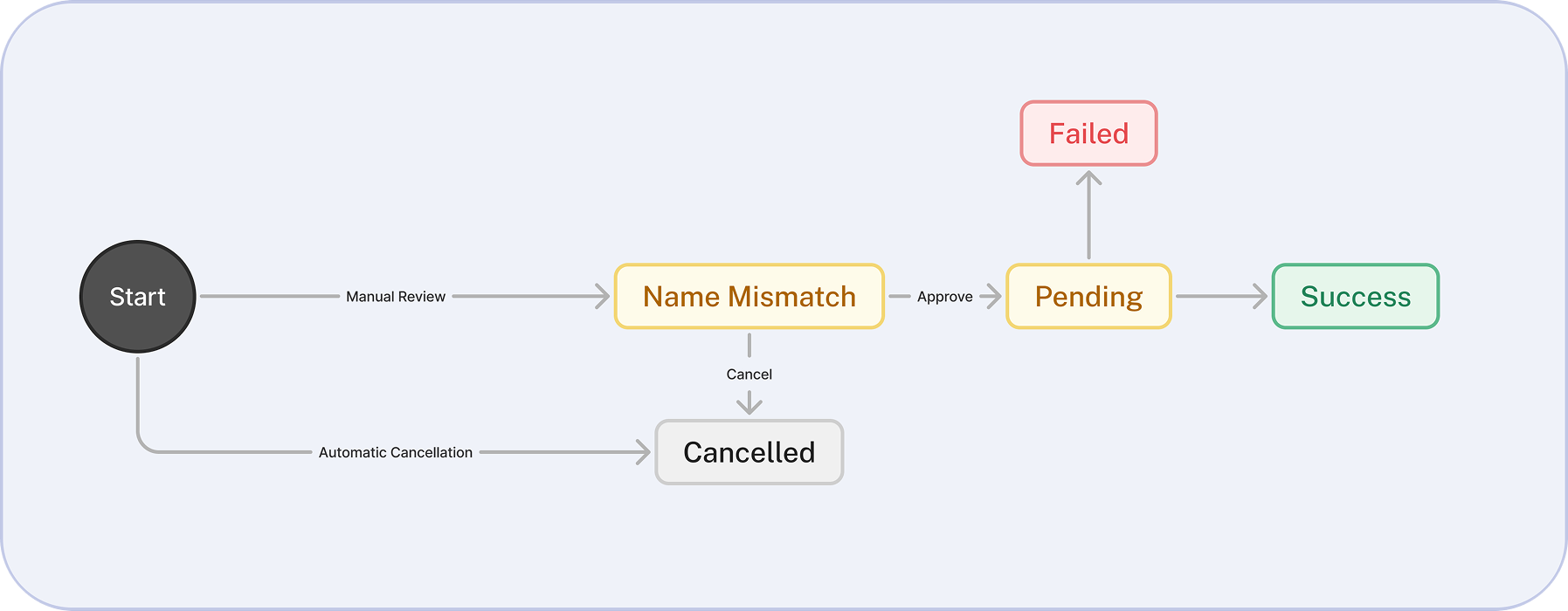
Currently, only IDR, MYR, and VND are supported for Name Mismatch Handling.
By default, Name Mismatch Handling is configured as Automatic Cancellation with a similarity threshold of 70%. This means any Pay Out transaction with a mismatch and similarity score below 70% will be automatically cancelled.
If you prefer to handle name mismatches using Manual Review or Hybrid Handling, you may request to change this setting by contacting us through your communication channel or by emailing [email protected]
Validation Logic
To determine whether there's a name mismatch between the name you submitted and the actual name from the bank, we follow this process:
- Preprocessing
- Trim all blank spaces (leading, trailing, and in-between multiple spaces).
- Remove stop words, honorifics, titles, symbols.
- Convert all characters to lowercase to avoid case sensitivity issues.
- Character Sorting
- Alphabetically sort the characters in both the submitted name and the actual name returned from the bank.
- This helps reduce issues due to transposition or different name orders.
- Levenshtein Similarity
- After normalization and sorting, we calculate the Levenshtein distance similarity between the two names.
- If the similarity is 70% or higher, we consider it a match. If you wish to modify the similarity threshold, you may request in the communication channel or through [email protected].
Example:
| Submitted Name | Actual Bank Name | Normalized & Sorted (Submitted Name) | Normalized & Sorted (Actual Name) | Levenshtein Similarity | Match Result |
|---|---|---|---|---|---|
| Wiranto Andi | Andi Wiranto | aadiinorrtw | aadiinorrtw | 100% | Matched |
| Nguyễn Thị Mai | Mai Nguyen Thiy | aeghiimnnstuy | aeghiimnnstuyy | 92.85% | Matched |
| Andi Wiranto Hadi | Andi Wira | aaddhiiinnortw | aadiinrw | 57.14% | Mismatched |
| Nguyễn Thị Mai | Nguyen Mai | aeghiimnntuy | egnuy | 41.67% | Mismatched |
You can check Levenshtein similarity between two names using tools like https://awsm-tools.com/levenshtein-distance
Handling Name Mismatch (Automatic Cancellation)
Transactions with recipient name mismatches are automatically cancelled. The cancellation callback will include the account name returned by the bank based on official records (see "errorMessage"). Example:
{
  "data": {
    "id": "payout-360-01KMMX4RZ2A6NZVZMKK6ZMWCEH",
    "status": "CANCELLED",
    "currency": "IDR",
    "feeAmount": "0",
    "sentAmount": "0",
    "createdTime": "2026-03-26T11:05:47.19135Z",
    "description": "",
    "updatedTime": "2026-03-26T11:06:02.811752266Z",
    "errorCode": "ACCOUNT_NAME_MISMATCH",
    "errorMessage": "Account name mismatch: The provided bank account name is 'Jc Boehm Test', but the bank records show 'Jc Boehm'.",
    "referenceCode": "ref-payout-20260326-1774523144923",
    "initiatedAmount": "10000",
    "customerReference": "ref-payout-20260326-1774523144923",
    "destinationPayoutMethod": "BANK_TRANSFER",
    "destinationPayoutChannel": "CENAIDJA"
  },
  "timestamp": "2026-03-26T11:06:06.309161274Z",
  "schemaVersion": "1.0.1"
}
Handling Name Mismatch (Manual Review)
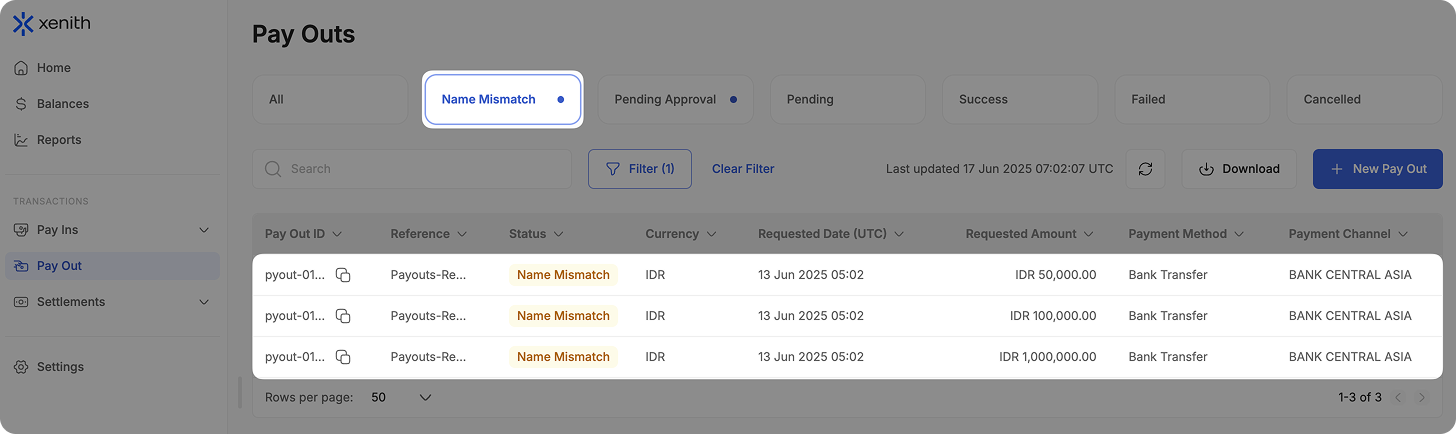
Transactions with recipient name mismatches are routed for review in the merchant dashboard, where you can choose to approve or cancel them.
-
Transactions are labeled as "Name Mismatch" instead of failing immediately.
-
You can manage these transactions in the "Name Mismatch" tab on the dashboard.
-
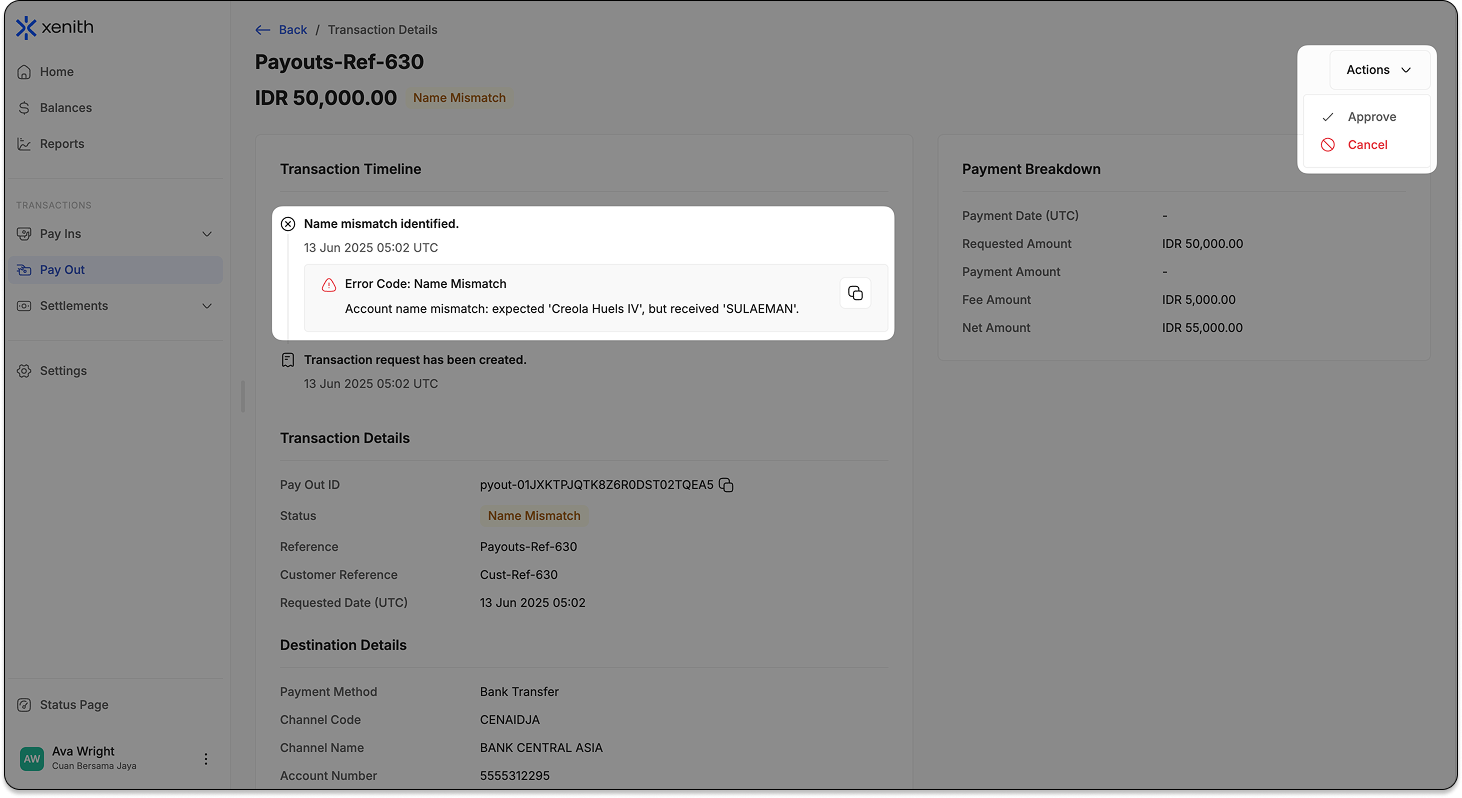
On the transaction details page, you can take one of the following actions:
-
Approve – Process the transaction using the bank’s recorded name.
-
Cancel – Cancel the transaction immediately.
Actions are available for Merchant Users with "Checker or Full Access" Pay Out Module Permission:
-
Important: If you choose Manual Review to handle Name Mismatch, subscribe to Pay Out Name Mismatch notifications to receive an email notification whenever a payout transaction is flagged. For more details, please refer to Notification module here.
Approving a Name Mismatch Transaction
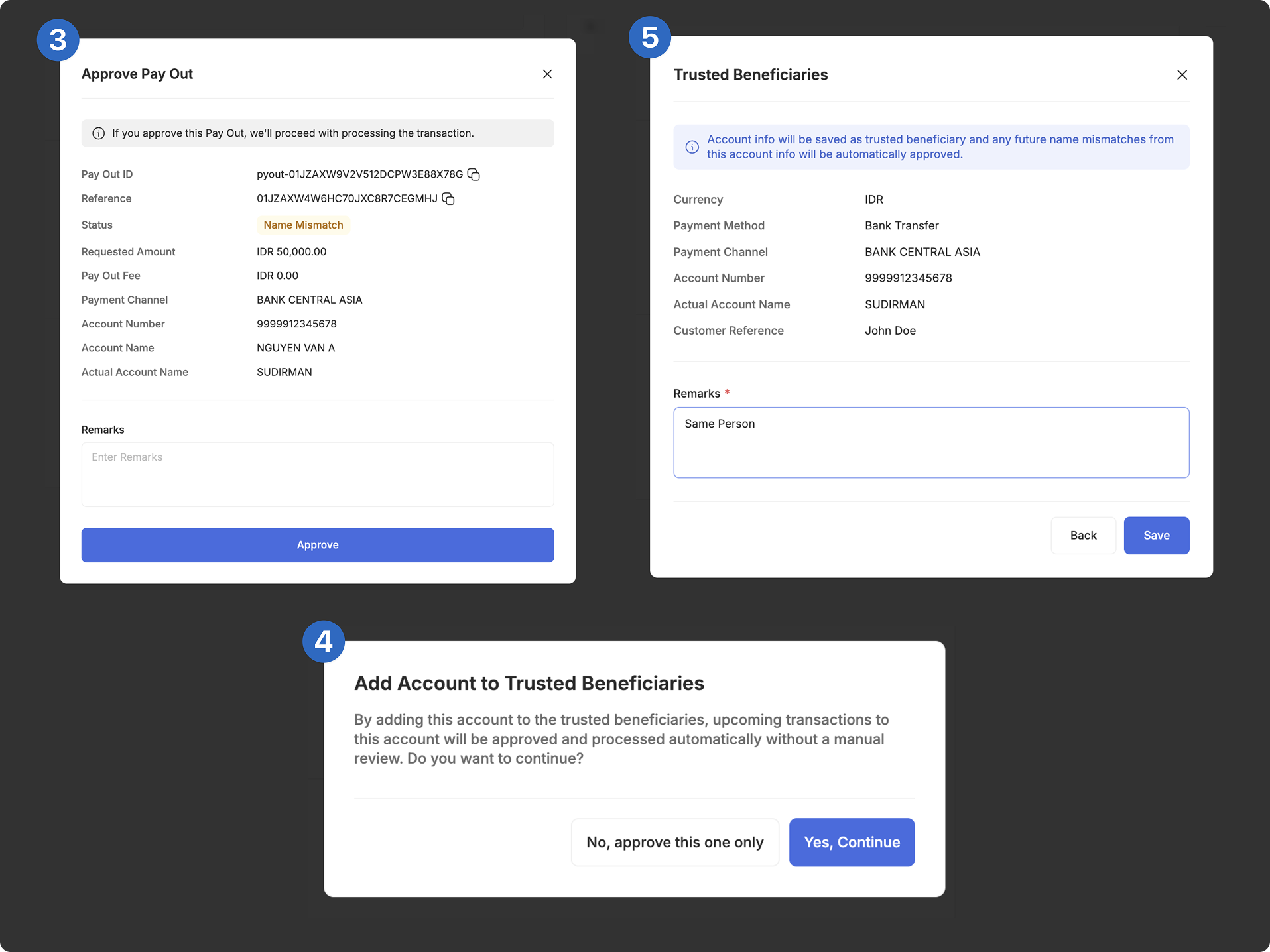
To approve a transaction despite a name mismatch:
- Select the Transaction: Click on the transaction you want to approve.
- Click "Approve": In the transaction details page, click "Approve".
- Review and Verify: Check the recipient’s details, including provided account name, provided account number, and bank’s recorded name. (Optional) Add remarks if needed. If all details are correct, click "Approve".
- Trusted Beneficiaries Confirmation: A confirmation pop-up will appear asking whether to add this account to your Trusted Beneficiaries. Click "Yes, Continue" to approve and whitelist the account. Once whitelisted, future Pay Outs matching this account will be auto-approved. Click "No, approve this one only" to approve only this transaction without whitelisting.
- Trusted Beneficiaries Review (optional): Once you choose "Yes, Continue" in step 4, a confirmation pop-up will appear. Remarks is mandatory to continue. If all details are correct, click “Save”.
- Transaction Processing: The transaction will be processed using the bank’s recorded name. You can track its progress in the transaction timeline.
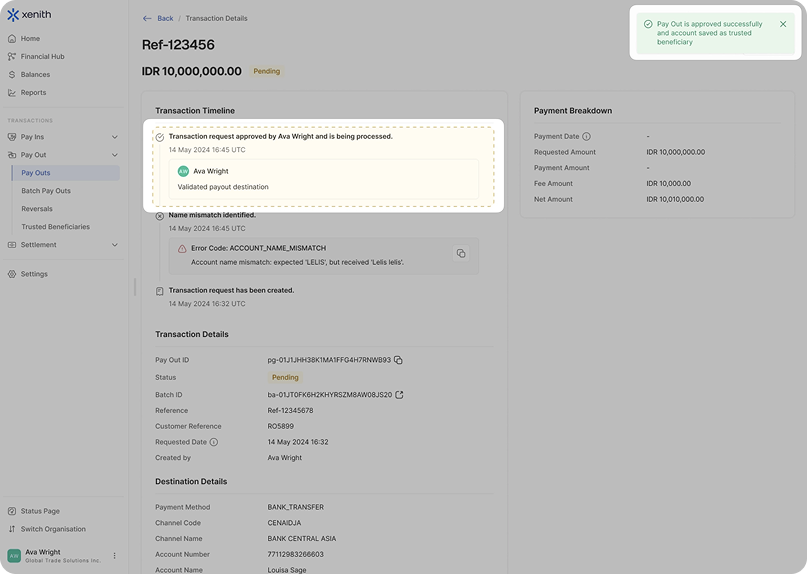
In cases where an approved Name Mismatch transaction is also added as a trusted beneficiary, the approver’s username will be recorded in the Transaction Timeline.
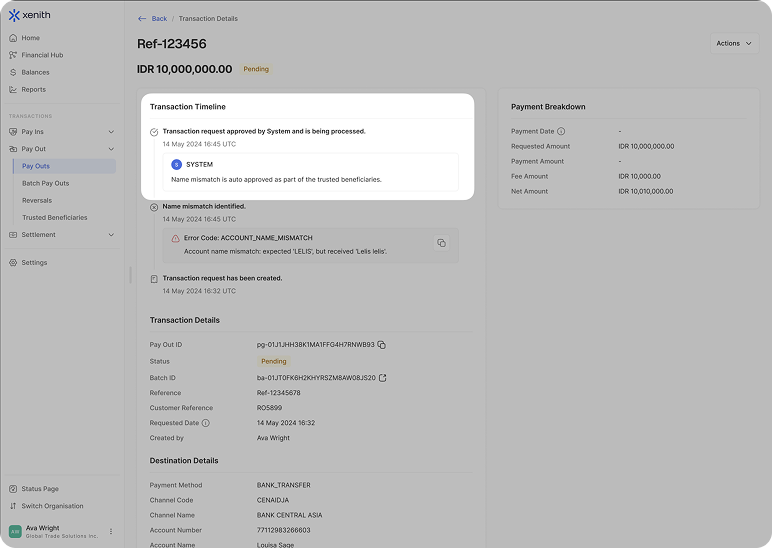
For future transactions involving the already recorded trusted beneficiary, the approver will be recorded as "System," with remarks indicating that the transaction was auto-approved as part of the trusted beneficiary process.
To learn more about accounts whitelisting, kindly refer to Trusted Beneficiaries module.
Cancelling a Name Mismatch Transaction
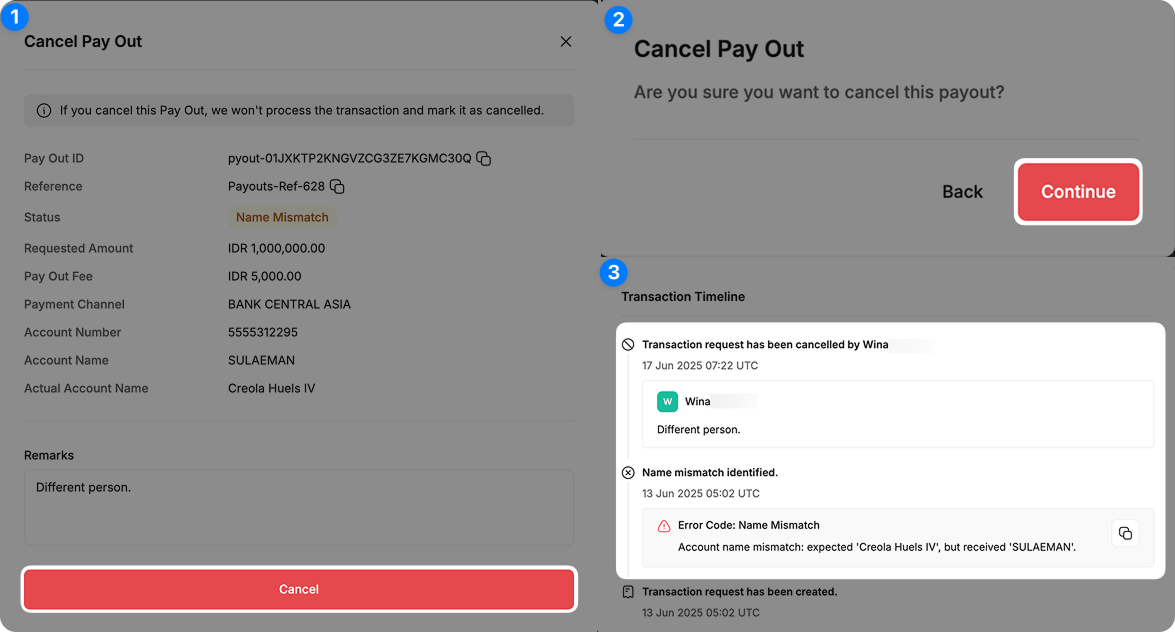
To reject a transaction due to a name mismatch:
- Select the Transaction: Click on the transaction you want to reject.
- Click "Cancel": In the transaction details page, click "Cancel".
- Review and Verify: Confirm that the names belong to different individuals. (Optional) Add remarks if needed. If you are sure the details are incorrect, click "Cancel".
- Confirm Rejection: A confirmation pop-up will appear. Click "Continue" to finalize rejection.
- Transaction Failed: The transaction status will update to "Cancelled". You can check the history in the transaction timeline.
Handling Name Mismatch (Hybrid Handling)
With Hybrid Handling, transactions with name mismatches are handled based on the configured similarity threshold ranges. Depending on the similarity score, a transaction may be either handled through Automatic Cancellation or routed for Manual Review. For example, you may request to configure Hybrid Handling as follows:
| Levenshtein Similarity | Handling |
|---|---|
| Below 70% | Automatic Cancellation |
| 70% – 80% | Manual Review |
| 80% and above | Considered matched and processed normally |
Important: If you choose Hybrid Handling to handle Name Mismatch, subscribe to Pay Out Name Mismatch notifications to receive an email notification whenever a payout transaction is flagged for manual review. For more details, please refer to Notification module here.
Updated about 2 months ago